

You are using an out of date browser. It may not display this or other websites correctly.
You should upgrade or use an alternative browser.
You should upgrade or use an alternative browser.
MR PC Hardware Enthusiasts - Anyone own an i7-3570K or i7-3770K?
- Thread starter ToxicBug
- Start date

ToxicBug
Well-known member
Last night I decided to man up and do the IHS TIM replacement on my 3770K. This is definitely, by far the most intense PC DIY I have ever attempted.
The test setup.

The other side of the room. I connected the DAC to my laptop to have music

My new PC. This is actually a 4-way SLI build, but I haven't received my other two 670's yet. Ironically, I ordered them before all the other parts.

Did a 5 min run in Intel XTU to get the temps with stock TIM under IHS, open case. Clocked to 4.6GHz @ 1.345v.

Cleaned the TIM off the NH-D14.

The 3770K.

Time to begin!

I need to get a box cutter into the gap between the IHS and the silicon. The guy in the the video makes it look a lot easier than it actually is. The glue is very viscous, so you need to press very hard on the blade, while not scratching the silicon since it has tiny tracks running on top of it. I found this to be best accomplished by turning the CPU at a 45 degree angle towards yourself and pushing on the blade with both hands.

Done!

The work area where this was accomplished.

IHS, silicon, and CPU die all nice and clean. I used isopropyl alcohol to remove the TIM and scraped off the glue with a plastic card.

I don't have Liquid Ultra, so I applied Noctua NT-H1 on both the die and on top of the IHS. If I do get the other TIM, then it will be easy to replace either way since the IHS won't be glued to the silicon anymore.

Dropped in CPU.

Placed the IHS on top and secured it with the CPU bracket. Time to put it all back together and see if it still works...

And it does!

Result with the NT-H1, open case.

PC back in its home <3

Here are the final results after a 5 min Intel XTU run: stock Intel TIM vs NH-T1, in a closed case. The goal was a 10C drop for max temps.


The test setup.
The other side of the room. I connected the DAC to my laptop to have music
My new PC. This is actually a 4-way SLI build, but I haven't received my other two 670's yet. Ironically, I ordered them before all the other parts.
Did a 5 min run in Intel XTU to get the temps with stock TIM under IHS, open case. Clocked to 4.6GHz @ 1.345v.
Cleaned the TIM off the NH-D14.
The 3770K.
Time to begin!
I need to get a box cutter into the gap between the IHS and the silicon. The guy in the the video makes it look a lot easier than it actually is. The glue is very viscous, so you need to press very hard on the blade, while not scratching the silicon since it has tiny tracks running on top of it. I found this to be best accomplished by turning the CPU at a 45 degree angle towards yourself and pushing on the blade with both hands.
Done!
The work area where this was accomplished.
IHS, silicon, and CPU die all nice and clean. I used isopropyl alcohol to remove the TIM and scraped off the glue with a plastic card.
I don't have Liquid Ultra, so I applied Noctua NT-H1 on both the die and on top of the IHS. If I do get the other TIM, then it will be easy to replace either way since the IHS won't be glued to the silicon anymore.
Dropped in CPU.
Placed the IHS on top and secured it with the CPU bracket. Time to put it all back together and see if it still works...
And it does!
Result with the NT-H1, open case.
PC back in its home <3
Here are the final results after a 5 min Intel XTU run: stock Intel TIM vs NH-T1, in a closed case. The goal was a 10C drop for max temps.

Cyclonicks
Well-known member

Tu m'donnes le goût de m'en pogner un haha ça l'air l'fun! Nice job & drop!
Watercool that mofo
Slightly jelly @ quad sli
ToxicBug
Well-known member
Tu m'donnes le goût de m'en pogner un haha ça l'air l'fun! Nice job & drop!
Watercool that mofo
Slightly jelly @ quad sli
Thanks! To be honest, I'm getting very good performance from that case on air. Ivy Bridge gets stuck after 4.7 GHz and starts requiring ridiculous voltage, regardless of temps.
I hope that 4-way SLI won't be too hot, but I'm guessing that in the worst case my video cards' OC will be limited. I need all four though, not many recent games are playable maxed out at 7680x1440 (8064x1440 bezel corrected) in 2-way SLI. I'm getting around 30 fps in Dragon Age II and similarly demanding titles, so if 4-way SLI scales well at this resolution, it should be perfect. Can't say the same for Crysis 2 and BF3, I'm only getting around 22 fps in those, so even at 44 fps it won't have the smoothness of 60+ fps. I'm planning on upgrading the cards when the new lineup comes out, hopefully with the "Big Kepler", that's why I don't want to commit to water.
Louispgagne
New member
4-Way SLI + 3 Monitors?! wtf dawg, what games do you play.
Your setup is pretty fucking gangster...but i dont think BF3 and games like that are necessarily more enjoyable than with a single card + 2 monitor. havent tried Crysis...but reviews are saying it isnt that fun.
Your setup is pretty fucking gangster...but i dont think BF3 and games like that are necessarily more enjoyable than with a single card + 2 monitor. havent tried Crysis...but reviews are saying it isnt that fun.
Cyclonicks
Well-known member
As tu essayé the witcher 2?
Ce jeu là tire tellement de jus haha selon une lecture de mon ups(précis?)
mon ordi (980x @ 4.20, 580 sli @ 936mhz) tire comme 970watts lol!
Pi j'ai juste un écran lol 2560x1440
Ce jeu là tire tellement de jus haha selon une lecture de mon ups(précis?)
mon ordi (980x @ 4.20, 580 sli @ 936mhz) tire comme 970watts lol!
Pi j'ai juste un écran lol 2560x1440
Louispgagne
New member
ta un 980x ?? 1000$ lol.....malade.....je payerais jamais ca pour un esti de processeur
ToxicBug
Well-known member
4-Way SLI + 3 Monitors?! wtf dawg, what games do you play.
Your setup is pretty fucking gangster...but i dont think BF3 and games like that are necessarily more enjoyable than with a single card + 2 monitor. havent tried Crysis...but reviews are saying it isnt that fun.
Thanks
As far as three screens vs one goes, here's what I have to say. I got the screens 6 months ago, but I only upgraded my old PC (i7-950 and 2-way SLI motherboard) with two 670's two weeks ago. My goal was to play the most demanding games maxed out on one screen and less demanding games like Dirt 3 on three. After having played for a bit on three screens and going back to one for Crysis 2, I ordered a new PC for 4-way SLI As tu essayé the witcher 2?
Ce jeu là tire tellement de jus haha selon une lecture de mon ups(précis?)
mon ordi (980x @ 4.20, 580 sli @ 936mhz) tire comme 970watts lol!
Pi j'ai juste un écran lol 2560x1440
Haven't tried it, not really interested in Witcher 2. Some games are not coded very efficiently, that's just something I have to live with at this point. I'm pretty sure I won't be able to max out Metro 2033, either.
Cyclonicks
Well-known member
Je comprends pour le manque d'intérêt...
C'est le plus beau jeu que j'ai vu jusqu'à présent les settings au fond. C'est pas très simple à apprivoiser comme jeu par contre..
C'est le plus beau jeu que j'ai vu jusqu'à présent les settings au fond. C'est pas très simple à apprivoiser comme jeu par contre..

RevoluX
Well-known member
BF3 serait zero-problème à 3.5GHz aussi. Tu OC parce que t'as payer extra pour un K-series, pas parce que t'en as besoin. C'est quoi tes temps après 5 min dans IET? Si t'es encore sur le HSF stock, je mettrais pas beaucoup plus que ce que t'as maintenant. Il y a des chances que ton OC automatique a juste trouvé le plus grand OC avec le stock voltage. Si tu vas commencer à ajouter du voltage, ça fait grimper tes températures en fonction quadratique à la place de linéaire pour la fréquence.
jai pas essayer IET ma essayer sa a soir, je metterai pas plus, sa va rester comme sa c suffisant pour moi jveut que sa reste stock pis que sa soit fiable et stable donc jtouche pas au voltage stune tite machine de gaming thats it, jai OC comme ta dit pas pke jen ai besoin, pke stait disponible pis que stait facile
ToxicBug
Well-known member
jai pas essayer IET ma essayer sa a soir, je metterai pas plus, sa va rester comme sa c suffisant pour moi jveut que sa reste stock pis que sa soit fiable et stable donc jtouche pas au voltage stune tite machine de gaming thats it, jai OC comme ta dit pas pke jen ai besoin, pke stait disponible pis que stait facile
Cool, sounds good! By the way, it's actually called Intel XTU, my bad!

android25ua
Well-known member
Hey guys,
As you may know, the Ivy Bridge K-series CPUs run a lot hotter than Sandy Bridge when overclocked. This is actually due to Intel using a TIM instead of a fluxless solder to fit the IHS on top of the heat spreader:
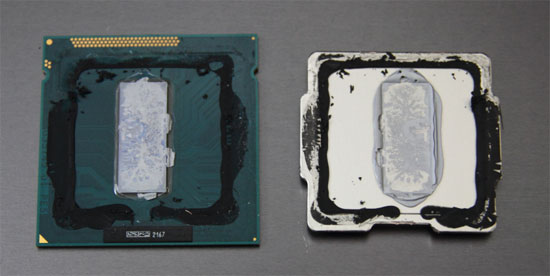
I put together my Z77 system with a 3770K a few days ago. I was just wondering if any of you have tried replacing the TIM under the IHS with Liquid Ultra or similar? Did you succeed?
I don't have the Liquid Ultra TIM, but I'm thinking about replacing it with Arctic Silver 5 or Noctua NT-H1 for now. If I do find Liquid Ultra later on, it's going to be an easy replacement since the IHS won't be glued to the CPU anymore.
Thoughts? Would you gamble $350 for getting 10C lower temps? I wouldn't, but I'm think about doing it for the experience and because I think it's really cool
Holy shit, you are serious about your stuff... I feel SOOOO out-dated now.
RevoluX
Well-known member
bon ben jen profite penda t qui a des crack de pc ici
jai un set de tritton ax pro pis jlai brancher sur mon pc, mon board c un MSI Z77A-GD65, yé brancher optique mais tabarnak jpas capable de faire sortir le mode digital de mes écouteurs, je sais pu trop quoi faire en fais ya tu qqn qui a une idée? mes pilotes sont a jours, pis jai verifier pis le board est 5.1 dolby a ce que jai lu donc ya aucune raison qui le pogne pas
jai un set de tritton ax pro pis jlai brancher sur mon pc, mon board c un MSI Z77A-GD65, yé brancher optique mais tabarnak jpas capable de faire sortir le mode digital de mes écouteurs, je sais pu trop quoi faire en fais ya tu qqn qui a une idée? mes pilotes sont a jours, pis jai verifier pis le board est 5.1 dolby a ce que jai lu donc ya aucune raison qui le pogne pas

Karl55
New member
bon ben jen profite penda t qui a des crack de pc ici
jai un set de tritton ax pro pis jlai brancher sur mon pc, mon board c un MSI Z77A-GD65, yé brancher optique mais tabarnak jpas capable de faire sortir le mode digital de mes écouteurs, je sais pu trop quoi faire en fais ya tu qqn qui a une idée? mes pilotes sont a jours, pis jai verifier pis le board est 5.1 dolby a ce que jai lu donc ya aucune raison qui le pogne pas
Tu a essayer de jouer avec des settings de paneau de controle de son?
RevoluX
Well-known member
Tu a essayer de jouer avec des settings de paneau de controle de son?
ouep pis sa la rien changer
ToxicBug
Well-known member
Sandy Bridge is still excellent and it can actually overclock higher than Ivy Bridge while running at lower temps. Given sufficient GPU power, your 2500K will be able to run the newest games maxed out for a long time. The main reason I went with Ivy Bridge is because I need native PCI-E 3.0 due to 4-way SLI, since it actually makes a big difference running in 8x/8x/8x/8x. Sandy Bridge-E CPU's and X79 motherboards are a lot more expensive, without offering an advantage in gaming performance, so the choice was clear.2500@ 4.5ghz still does the job well with my oced 7850.
could probably get bigger overclocks but im picky about the sound my computer makes.
28c at idle with a zalman 7x and a cm storm trooper case
I was very outdated up until a bit over a year and a half ago, when I finally found a job and decided to buy a new PC. I've been keeping in the loop since then. During my free time I read technology news, hardware reviews, and I'm also active on [H]ardOCP. I must say, this helps a lot when it's time to buy new components. For my latest build, the only parts that I haven't had bookmarked from reviews was the PSU and motherboard. I actually had other ones bookmarked, but I realized that the PSU was outdated and a less expensive Ivy Bridge 4-way SLI motherboard came out a few days before I placed my orderHoly shit, you are serious about your stuff... I feel SOOOO out-dated now.

Cryptkeeper
MR staff member
I'm picking up a 27" monitor to fit between my 2 24's... I'd like to run games across the 3 monitors but I have a 560ti and a 2600k, what do you guys suggest I do?
ToxicBug
Well-known member
You need 3 screens of the same model for Surround with nVidia. Not sure about Eyefinity, not interested in AMD anymore.I'm picking up a 27" monitor to fit between my 2 24's... I'd like to run games across the 3 monitors but I have a 560ti and a 2600k, what do you guys suggest I do?